
User Management
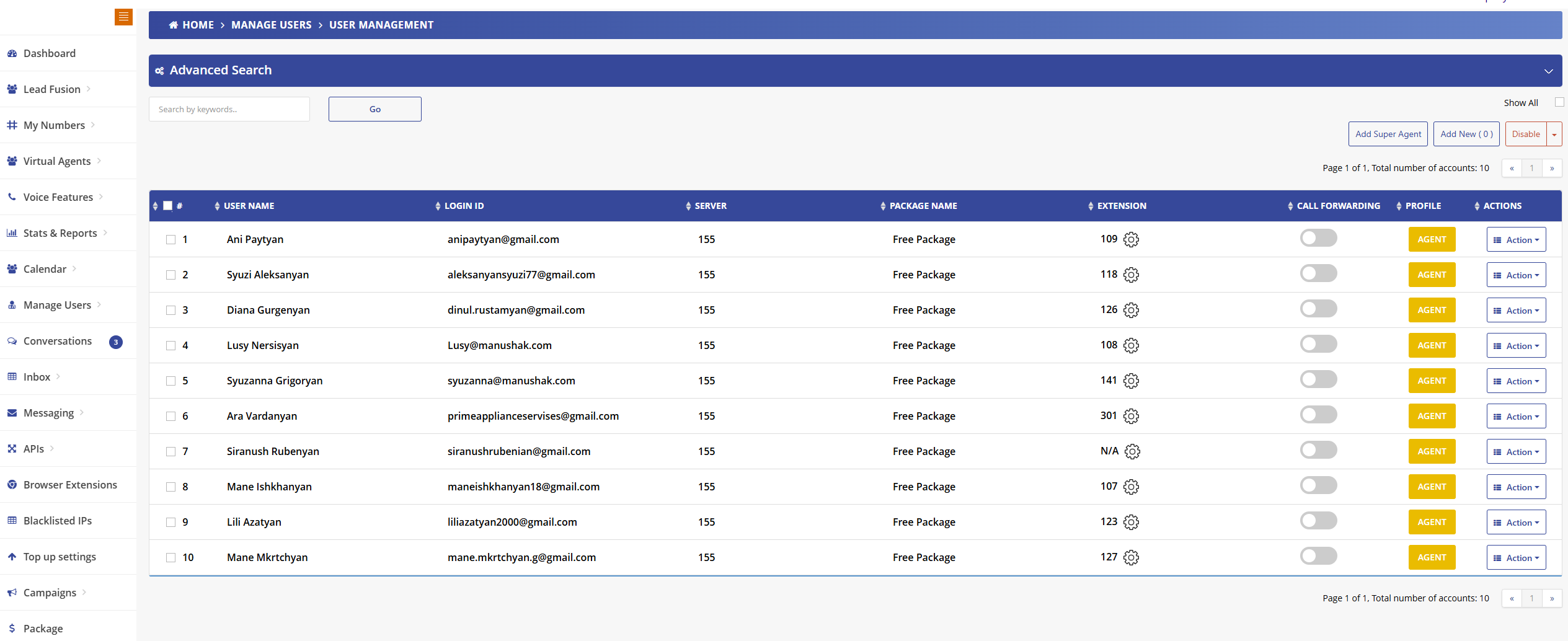
User Management Overview
Manage all your team members from a centralized interface. Add, edit, or disable users, assign extensions, and configure individual settings for each agent. Understanding user roles and permissions is essential for effective team management in Mango9.
User Roles & Permissions
Super Agents
Super agents have full administrative privileges and can perform all actions available to the client account owner. They have complete control over the system.
- Add and remove users from the system
- Assign and modify user permissions and roles
- Configure system-wide settings and integrations
- Access all features, reports, and analytics
- Manage billing, packages, and account settings
- View and manage all appointments across users
- Full access to conversation history and recordings
Regular Users (Agents & Clients)
Regular users can be designated as agents or clients for marketing, lead management, and appointment handling. These users have limited access tailored to their role.
- Access their own extension and phone settings
- View and manage their assigned appointments
- Make and receive calls through their extension
- Perfect for sales teams, support agents, or client accounts
- Can be used for selling leads, calls, and appointments to clients
- Limited access to system configuration and other users' data
Employee Assignment & Shared Clients
Administrators and designated employees can assign appointments in the calendar of clients under "Shared Clients." This enables centralized appointment management across multiple client accounts.
- Assign appointments to client calendars on their behalf
- Manage multiple client accounts from a single interface
- Ideal for agencies managing clients or resellers
- Coordinate appointments across different client businesses
- Maintain visibility of all scheduled activities for clients
Common Use Cases
Agency Management
Create client accounts as regular users and manage their appointments, leads, and calls from your main account. Perfect for marketing agencies selling appointment-setting services.
Sales Team Structure
Add sales agents as regular users with their own extensions. Super agents (managers) can oversee all activities while individual agents focus on their assigned tasks.
Reseller Accounts
Set up client accounts for customers you're selling leads or appointments to. Manage their calendars and appointments through shared access while they receive the benefits.
User Table Columns
- User Name: Full name of the agent
- Login ID: Email address used for account login
- Server: Server assignment for the user
- Package Name: Assigned service package (Free Package, etc.)
- Extension: Phone extension number with configuration access
- Call Forwarding: Toggle to enable/disable call forwarding
- Profile: Agent role designation
- Actions: Quick access to user-specific actions
Management Actions
Add Super Agent
Create users with elevated permissions and full system access
Add New User
Add standard agents with limited permissions
Disable Users
Temporarily disable user accounts without deleting data
Advanced Search
Use the Advanced Search feature to quickly find users by keywords, filter by package, server, or other criteria. Click "Show All" to display the complete user list.
Extension Configuration
Each user's extension number includes a settings icon for quick access to detailed configuration options including voicemail, call routing, and feature codes.