
Mobile APIs and backends
Understand when a mobile app needs a server API, database, or external service before it can work.
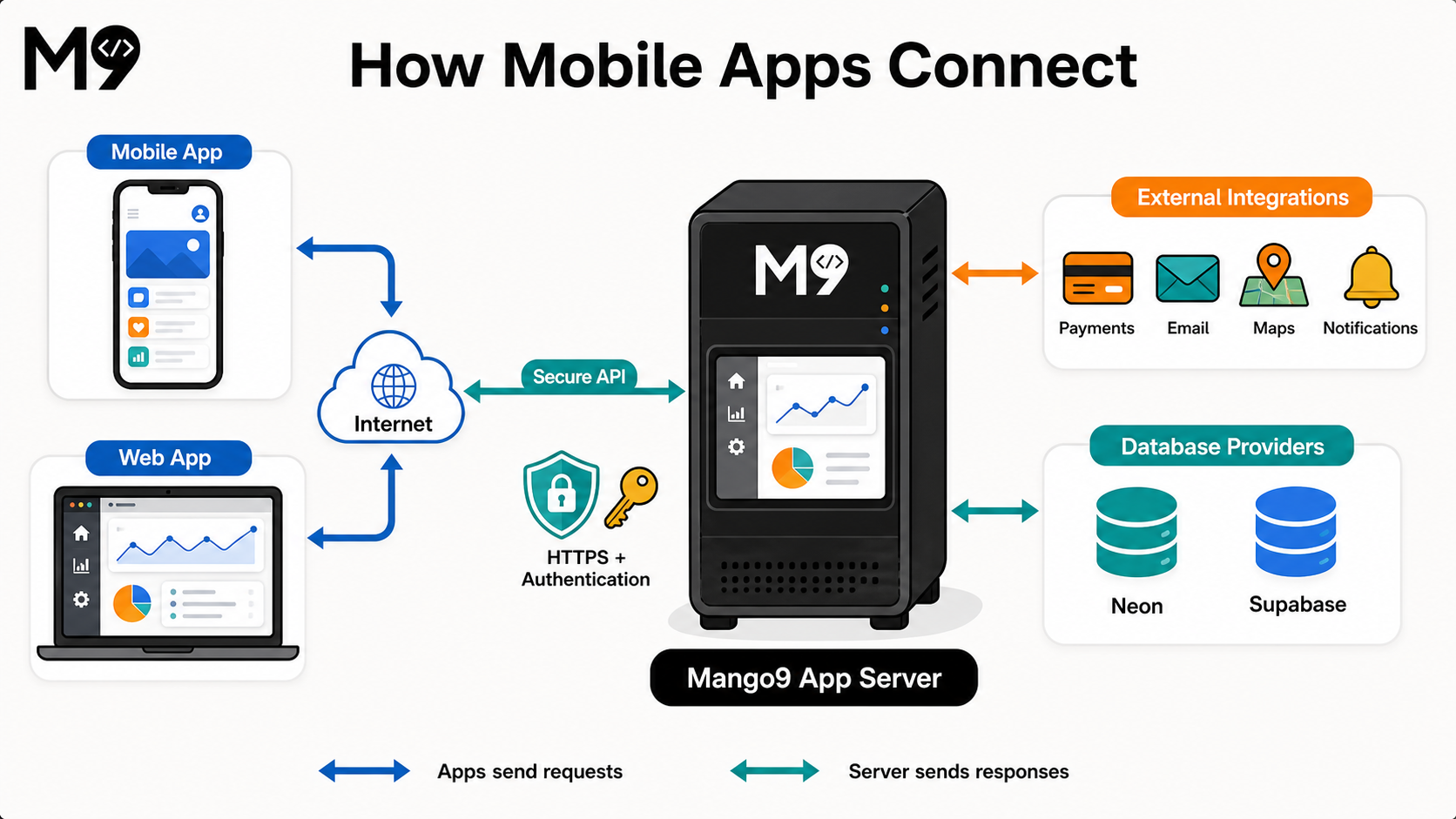
A mobile app can look complete while still needing services behind it. Screens, navigation, forms, and device features run in the app. Shared accounts, durable records, payments, messages, and most integrations need a backend that the app can reach securely over the internet.
An API—an application programming interface—is the controlled doorway between the mobile app and that backend. The app sends an HTTPS request such as “show my appointments.” The server verifies who is asking, applies the business rules, reads the correct records, and returns only the information that person is allowed to see.
What runs where
| Part | What it does | Examples |
|---|---|---|
| Mobile app | Displays information and handles actions on the device | Screens, navigation, camera button, local settings |
| HTTPS API | Accepts approved requests from the app | Sign in, load orders, save a booking, request a payment |
| App server | Enforces permissions and business rules | Decide which records a user can see, calculate a price, validate a change |
| Database | Keeps information that must survive and be shared | Accounts, appointments, orders, messages, inventory |
| External service | Performs a specialized job | Payments, email, SMS, maps, AI, push delivery |
The normal path is:
Mobile app → internet → HTTPS API → app server → database or external service
The response travels back through the API to the app. The mobile package must never connect by exposing a database password, payment secret, or private service key.
When an API is required
A backend API is normally required when the app includes:
- accounts, sign-in, roles, or team permissions;
- records shared between people or synchronized across devices;
- bookings, orders, messages, inventory, or other durable data;
- payments, subscriptions, refunds, or account credits;
- email, SMS, remote push notifications, maps, AI, or another provider;
- file uploads that other people or devices must access;
- private calculations or business rules that users must not bypass;
- admin actions, audit history, webhooks, or scheduled work.
Example: A “Book appointment” screen is only the interface. A working booking feature also needs an API that checks availability, prevents two customers from taking the same time, saves the appointment, and sends any confirmation.
What may work without a backend
Some apps can remain device-only:
- a calculator that forgets its result;
- a guide whose content ships inside the app;
- private notes intentionally stored on one device;
- preferences such as theme or onboarding progress;
- an offline tool that never shares or synchronizes data.
Device-only storage is not shared storage. If a person signs in on another phone, collaborates with someone else, or must recover records after losing the device, the data needs a secure synchronization service and usually a database.
What Mango9 needs to connect
Describe the whole outcome, not only the visible screen. For each server-dependent feature, identify:
- The users and permissions. Who may perform the action and which records may they access?
- The durable data. What must be saved, synchronized, retained, or deleted?
- The provider. Does the feature use Postgres, Stripe, Twilio, an email service, maps, AI, or another account?
- The credentials. Save keys in protected environment or integration controls, never in Chat or mobile source.
- The success and failure behavior. Define what the app shows when a request succeeds, is denied, times out, or cannot reach the network.
Build appointment booking for signed-in customers. Load available times from our server, prevent duplicate bookings, save the confirmed appointment in Postgres, and send a confirmation through our connected email service. Show clear offline, validation, and retry states. Do not place provider secrets in the mobile app.
Keep secrets and authority on the server
A mobile app is distributed to customer devices. Treat its compiled files as inspectable. Do not embed database passwords, private API keys, signing secrets, service-account files, or unrestricted provider tokens in the app.
The server should:
- authenticate the person making each protected request;
- authorize access to the exact account and record;
- validate input rather than trusting the app;
- keep provider secrets in protected environment variables;
- limit abusive traffic and record useful operational errors;
- return only the data the screen needs;
- handle provider webhooks and private callbacks.
A public identifier intended for a mobile SDK may be safe to ship, but that does not make a private secret safe. Follow the provider's mobile security guidance and restrict public keys by app, platform, domain, or capability where supported.
Development and production
Development and production should use separate environments, data, and credentials wherever the provider supports them. Test records and sandbox payments should not mix with real customer activity.
Before a store release, confirm that the approved native build points to a stable production API—not a temporary preview address or a developer's local server. Test the production connection on a physical device over ordinary Wi-Fi and cellular data. Include signed-out, expired-session, offline, timeout, and provider-error paths.
Changing the server later does not always require a new store build if the API address and contract remain compatible. Changing an embedded endpoint, mobile permission, native capability, or client behavior normally requires a new native build and may require another store review.
Backend readiness checklist
- Every server-dependent screen has a real API route.
- Production data has a durable database when required.
- The app authenticates users and the server enforces permissions.
- Private keys and database credentials exist only in protected server settings.
- External provider accounts are active and production credentials are connected.
- The production API uses HTTPS and has a stable address.
- Offline, timeout, validation, and retry states have been tested.
- Logs expose useful failures without recording secrets.
- Privacy disclosures match the data the app and its providers actually collect.
- A physical-device test proves the final package reaches production services.